Getting Started with AWS Cloud
This article introduces developers to some of the key concepts to consider when learning about cloud computing — an area of technology that is gaining more and more relevance today. From handling large amounts of data to hosting websites and applications, the cloud is an essential tool for any developer.
👋🏻 Take this as an introduction, not a definitive guide — I'm still learning too!
What's the first step to creating resources in the cloud?
The first crucial step when creating cloud resources is selecting a region from which the cloud provider (AWS) will serve our resources. This decision depends on several factors, such as the geographic location of users, local laws and regulations, and costs associated with each region.
Regions in AWS are designed to offer high availability and redundancy. Each region is composed of multiple Availability Zones (AZs), which allow you to distribute your resources.
We need them to distribute our resources. Why? If one zone fails, the other one backs you up and serves your resources. This distribution guarantees the resilience of your applications: if one zone is affected by a failure, the other zones can back up and continue serving your resources. This is the essence of the high availability concept (High Availability).
Each AZ has one or more data centers with servers.
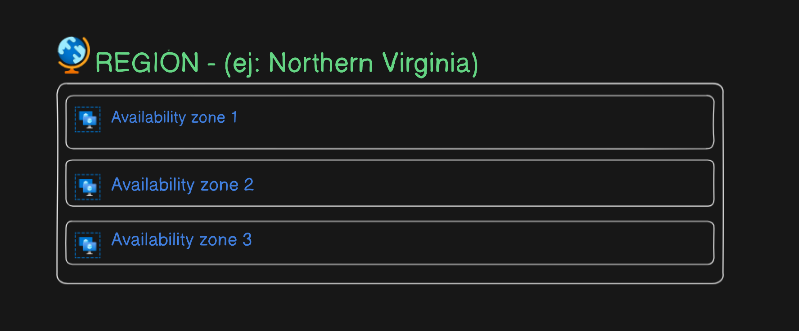
The more AZs a region has, the better the availability and recovery capacity of your applications.
Once you've selected a region, you can create your own Virtual Private Cloud (VPC). A VPC provides you with a completely isolated and customizable virtual network environment in the cloud.
Your own virtual datacenter
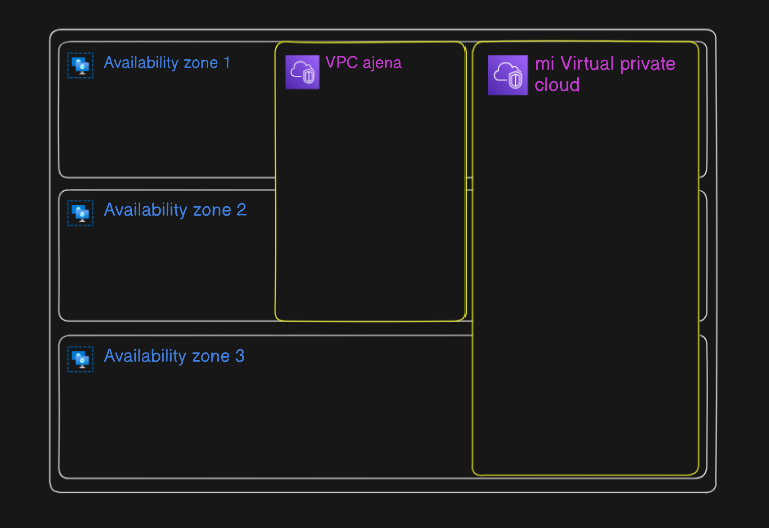
Example of a VPC distributed across 3 AZs
Within your VPC, you can define subnets that extend across different availability zones, allowing you to distribute your resources efficiently and guarantee the availability and performance of your applications. These subnets are like rooms in a building, where each room can have a specific purpose and contain specific resources.
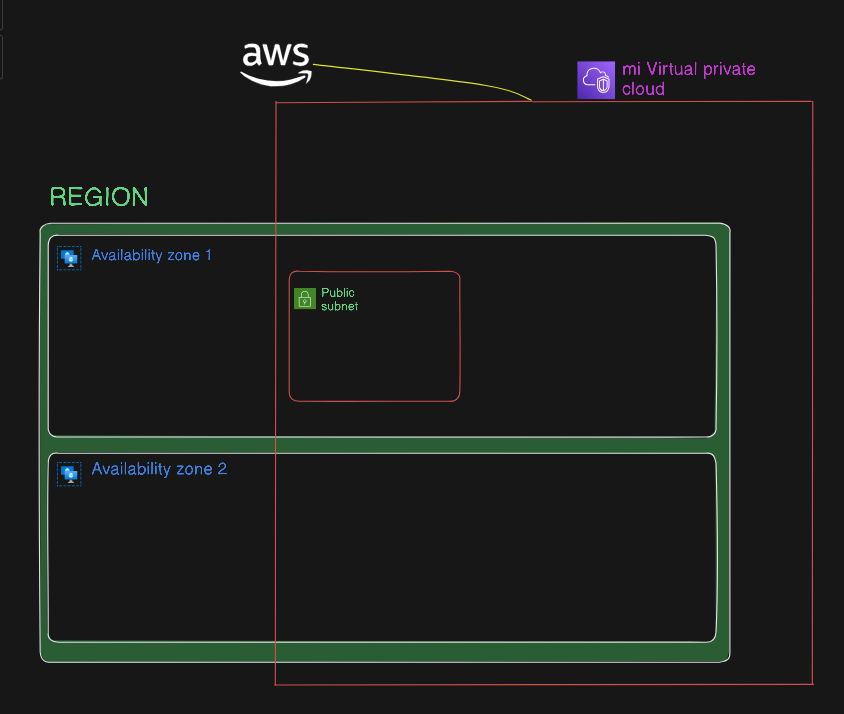
But VPCs are isolated by default — THEY HAVE NO INTERNET ACCESS, which can be a problem if your resources need to communicate with the outside world.
❓ How do we let other people access our resources (our website)?
To allow your resources inside the VPC, such as your website, to be accessible from the Internet, you need to configure an Internet Gateway. This allows you to associate your VPC with the Internet and place the resources you want to make public in a Public Subnet. This is a crucial step in making your applications and services accessible to your users.
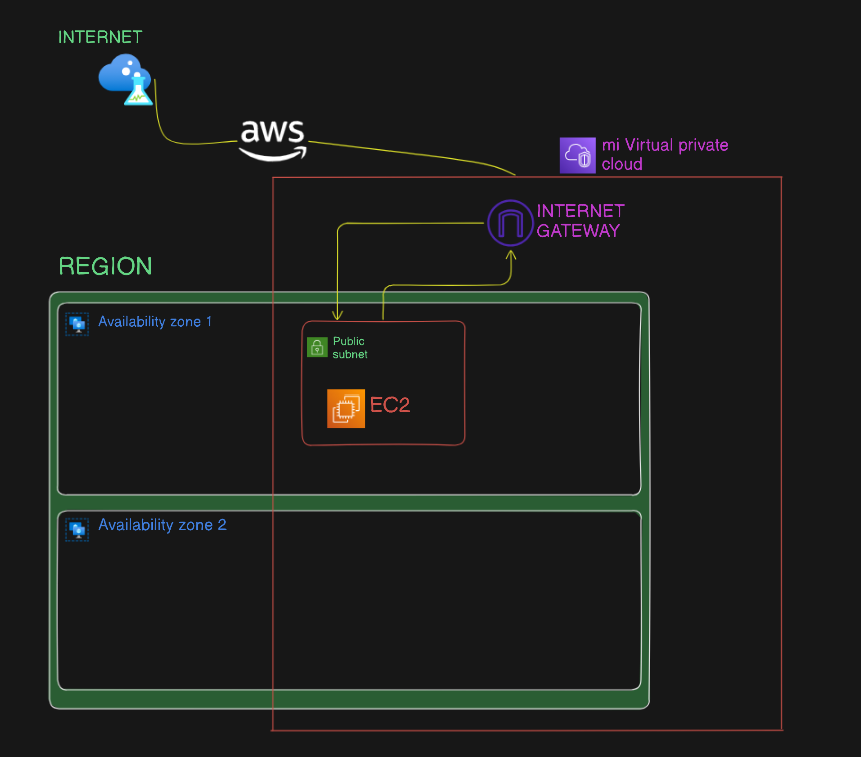
In this subnet, you can deploy EC2 instances, which are scalable and customizable virtual machines (VMs) that can serve web pages, act as SSH servers, and much more. EC2 instances are one of the most widely used resources in AWS, thanks to their flexibility and the wide variety of instance types available.
Now we could have our first accessible, public website for the whole world. This is a big step for any developer — it demonstrates the ability to correctly configure a cloud environment and deploy an application on it.
⚠️ But... this doesn't scale
When your website starts getting a lot of traffic, a single EC2 instance may not be enough to handle the load. We need something that scales better, something elastic...
- Elastic Load Balancers (ELB): Now we can distribute the load of all incoming traffic across multiple EC2 instances in different Availability Zones. ELBs are a powerful tool for handling incoming traffic, as they can distribute the load across multiple instances, helping prevent overloading a single instance and improving the availability and performance of your application.
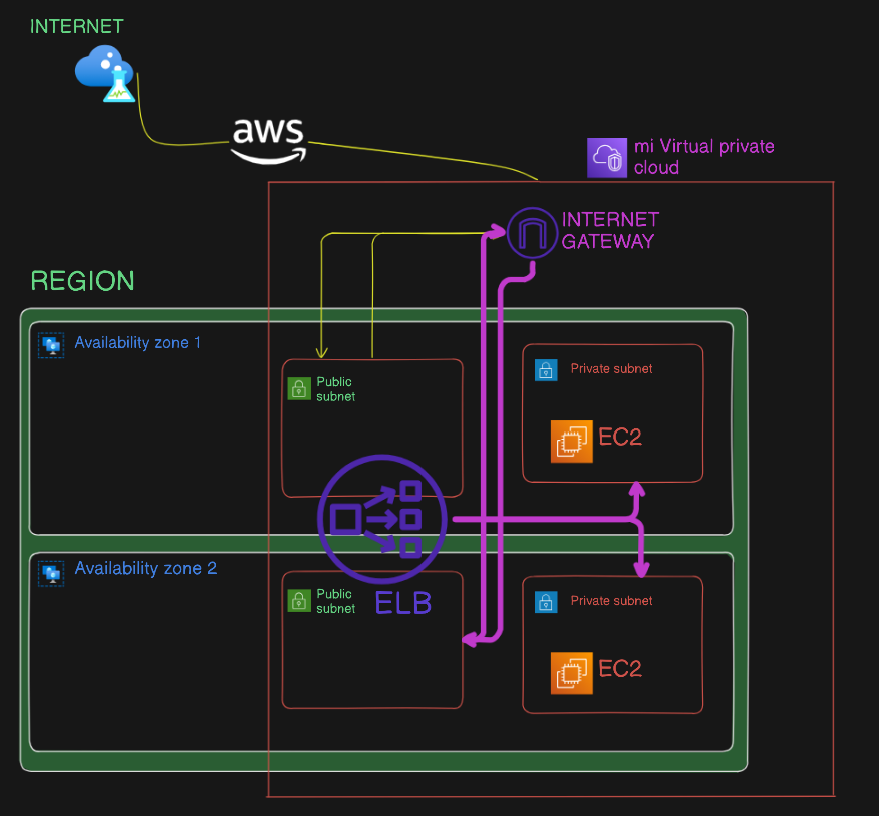
An ELB also gives us security — we can now place our VMs in PRIVATE SUBNETS and the ELB in a public one. Traffic arrives there and our VMs are not accessible from outside. This is a common approach to improve the security of a cloud application, as it limits direct access to instances and only allows traffic through the load balancer.
❓ What if our VMs in private subnets need to access the internet?
- You can configure a NAT Gateway in your public subnets. This allows instances in private subnets to connect to services outside the VPC securely, while external services cannot initiate a connection to these instances, which strengthens the security of your environment. The NAT Gateway acts as an intermediary between instances in the VPC and the internet, allowing instances to access internet resources without being directly exposed.
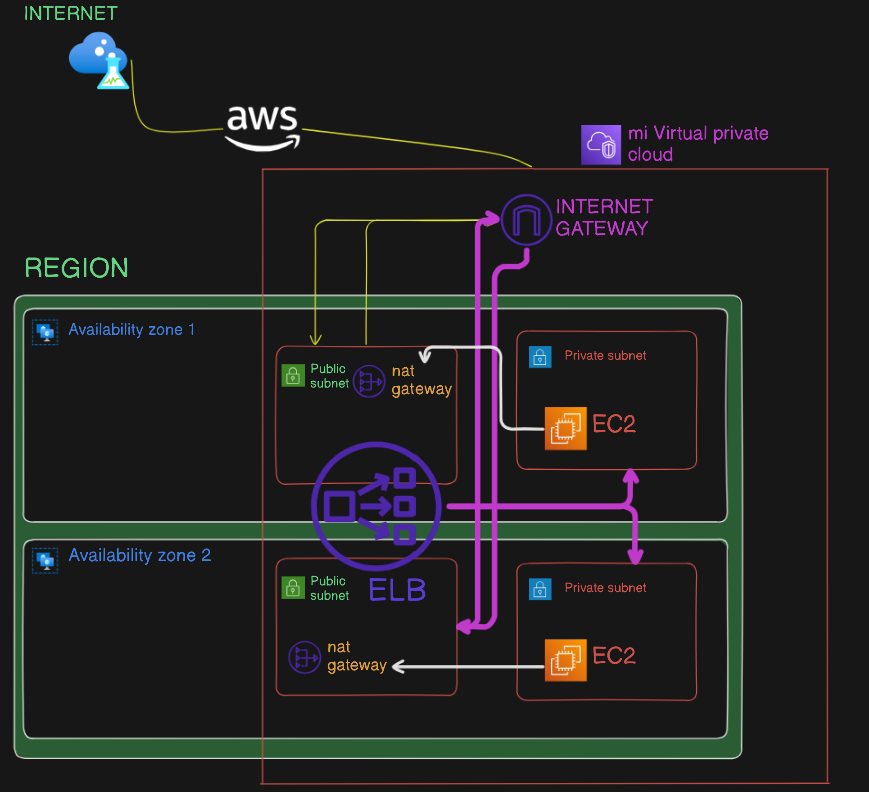
And for our VMs that need internet access?
When deploying a web application on AWS, it's essential to consider internet connectivity to ensure access to external resources such as API integrations, authentication services, software updates, and more. Properly configuring network resources — such as public and private subnets, internet gateways, and load balancers — will allow you to build highly available, scalable, and secure applications in the cloud. This is a crucial aspect of cloud architecture and essential for the success of any cloud application.
More resources: